
Key Takeaways
- Webflow gives designers full visual control without forcing them into rigid templates.
- Its visual editor reflects real front-end logic and produces clean, semantic code.
- Design and development happen at the same time, reducing handoffs and rework.
- Built-in components, design systems, and CMS features support scalable websites.
- Webflow is powerful, but not ideal for complex applications or large-scale e-commerce.
No-code has exploded like a wildfire over the past few years. But not every no-code website development platform earns a designer’s respect. Yes, many of them break the code barrier, but are underdelivering and asking designers to compromise.
Many trade flexibility for speed, or simplicity for creative control. This leaves teams, especially professional designers, stuck with tools that age poorly and rack up technical debt. In reality, they’ve been craving the capability to design responsive websites in hours, without relying on multiple teams and tools.
Webflow has billed itself as a visual development platform that takes a different approach. It lets designers build professional, responsive websites visually without cutting them off from real front-end logic or future scalability.
This makes it powerful enough to support custom coding and versatile enough to play like a typical no-code builder.
That balance is the reason Webflow’s adoption keeps climbing. From powering a fraction of CMS-based websites a few years ago to over 1.2% in 2025, and why design teams are choosing it over rigid builders and bloated CMSs.
In this post, discover from a designer’s lens what Webflow nails about no-code development trends.
Strengths of Webflow’s no-code platform that designers crave
Whether you’re a Webflow website development services or a professional designer, no-code design tools is all you’ve been thinking about.
On the face of it, no-code web development tools are only for small-scale projects or “mom-and-pop” shops. The fact that giants run on Webflow says another story. These companies don’t use Webflow because they can’t afford engineers to build and maintain their websites. They use it because it’s powerful enough to handle high-traffic technical requirements while giving the creative team the keys to experiment. That alone is telling: Webflow is no way a “starter” tool. It’s a platform designers can scale with.
1. Creative control devoid of templates (finally)
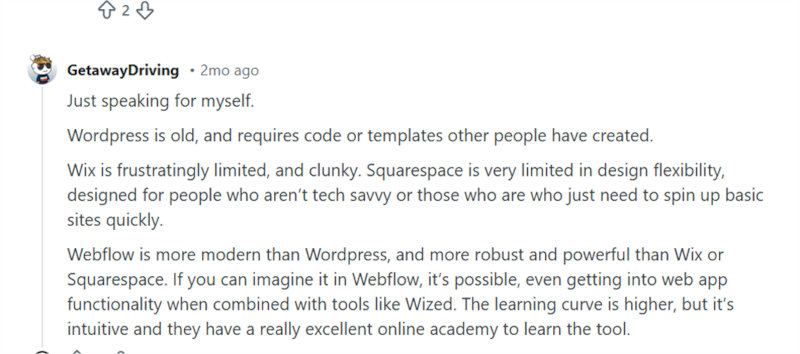
One of Webflow’s biggest wins is what it doesn’t force designers into. You don’t need to know how to code – but you’re also not boxed into rigid templates that smother your layout choices. Unlike template-first builders like Wix or Squarespace, Webflow gives designers full visual freedom.
This is what a Redditor has to say,
2. A Visual editor with the logic of the web
For most drag-and-drop builders, it’s a fair criticism that “no-code” tools produce messy, bloated “spaghetti code”. But Webflow isn’t a builder in the traditional sense; it’s a visual interface for the browser. Yes, it doesn’t pretend code is non-existent, it translates it.
When you change a padding value and see the layout shift instantly, the relationship between the property and the result clicks. By removing the “shortcuts,” Webflow forces you to understand the architecture of the web.
Plus, unlike the “notoriously horrendous” markup found in many CMS platforms, Webflow’s output is semantic and lean. So, you’re not confused by the mystery layer generating bloated, unreadable code in the background.
3. Design and development at the same time
Traditional workflows still treat design and development as separate phases. Naturally, there are a series of handoffs: wireframe to prototype, prototype to spec-sheet, spec-sheet to developer. Within this handoff conundrum, the design gets lost in translation.
Webflow seals that gap. You design and build in concert, seeing edits instantly as you make them. In the absence of “redlining” or laboring over specifications, it’s easier to save your design vision till the end while saving hours.
For smaller projects, especially, designers are known to skip wireframes and prototypes and go straight into Webflow, assembling layouts, testing interactions, and sharing live staging links in real time. It’s faster, more honest, and closer to how the web actually behaves.
4. Design systems to build designs quickly
If you love the concept of turning components – headers, cards, sections – into symbols and reused across pages, Webflow is the robust platform to offer you a lot.
When you want to reuse design elements throughout, Webflow lets you build a design system. It houses all your reusable components with content overrides. If you’re used to Symbols in Sketch or Components in Figma, you’ll feel more comfortable using this feature.
Not just that, if you’re working on multiple web development projects, you can go ahead and organize these components into Shared Libraries. With Shred Libraries, you won’t have to transfer assets across your workspace.
Combined with a CMS that allows marketers to update text while keeping the layout intact, you create and manage a scalable site.
5. CMS built for designers
The fact that most CMS platforms focus on content first and expect designers to adjust the layout later makes it tough for designers to prevent broken layouts. If they can have a more concrete layout that doesn’t fall apart the moment real content is added, a lot of time and sanity could be saved.
Thanks to Webflow’s editor, designers can define the structure before anyone modifies the content. Designers get to decide the design rules and how content behaves around it. Where titles wrap, how images scale, what happens when a description is too long, and which elements stay fixed no matter the edits.
This gives marketers, writers, or clients a controlled environment where only the fields you’ve approved – text, images, dates, tags – are updated inside the CMS. When content changes, Webflow automatically updates the existing design system. The rest of the features, such as spacing, typography, and responsiveness, remain untouched.
When Webflow might not be the right tool
Being a pro designer means knowing when to use a broad brush and when to use a fine-liner (metaphorically, of course!). Because, as much as we love Webflow, it’s not the perfect solution for every project, and sometimes it’s worth recognizing when to walk away from it.
- If your project is loaded with complex “if/then” logic, advanced backend functionality, or highly interactive application features, Webflow isn’t the best tool. For these, you’re better off with Bubble or traditional custom code.
- Webflow has e-commerce, but it isn’t Shopify either. If the core of your business is high-volume retail and logistics, it’s better to go with a platform built specifically for that.
Wrapping up
As the no-code movement gains traction, Webflow’s role in empowering designers is solidified. It’s an exceptional platform that delivers design freedom, scalability, content management, and efficient collaboration – all rolled into one. It enables designers to reduce design and development time without sacrificing control or quality.
FAQs
Is Webflow really different from other no-code builders?
Yes, it gives designers full layout control instead of locking them into templates. It also outputs cleaner, more semantic code than most drag-and-drop tools.
Do you need to know how to code to use Webflow?
No, but understanding basic web concepts helps you use it more effectively. Webflow teaches how the web works rather than hiding it.
Can Webflow handle large or high-traffic websites?
Yes, many large companies use it because it scales well and performs reliably. It is not just a tool for small or simple sites.
How does Webflow’s CMS help designers?
Designers can lock down layouts while letting others edit content safely. This prevents broken designs when text or images change.
When is Webflow not the right choice?
It is not ideal for complex backend logic or highly interactive applications. It is also not the best fit for large-scale e-commerce compared to Shopify.